Administrate General Release Notes
Coming Up This Week
New! Event Communications Tabs
We’re making it easier for your team to stay on top of all event-related communication — right where the action happens. With the new Communication tab inside Events, you’ll have complete visibility into everything that’s been sent, when, how, and to whom.
This will be live on Wednesday this week. No more switching between screens or chasing down email logs — it’s all right here.
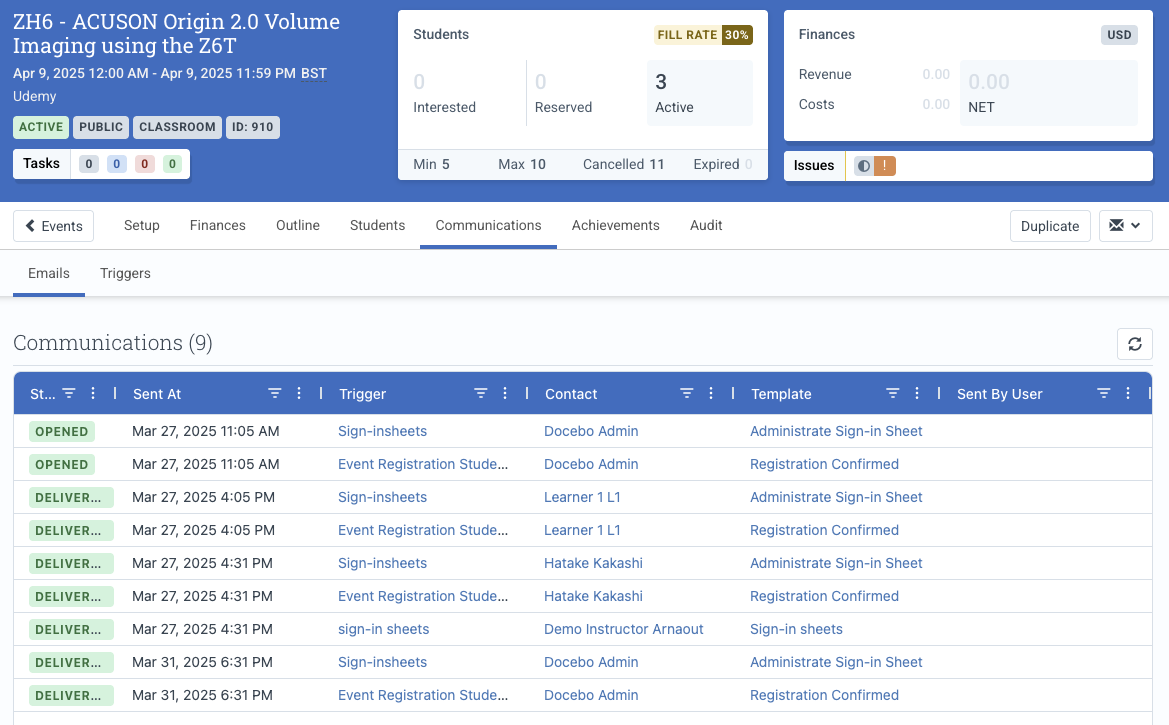
Here’s what the new Communication tab lets you manage:
- See a full communication history: Emails sent, their status (sent, bounced, failed, delivered,…), recipients, templates used, and which trigger sent them.
- Quickly search, filter, and sort: Want to see all bounced emails? Filter by status, sort by most recent, or search by contact name.
- Resend with ease: Click any row to reopen the email modal, review the message, and hit send again.
- Manage attachments: View and add attachments associated with the email.
- Review Configured Triggers: See all your configured Triggers for the Event right within the Event itself. Quickly confirm what’s automated, whats scheduled to go and that everything is configured correctly.
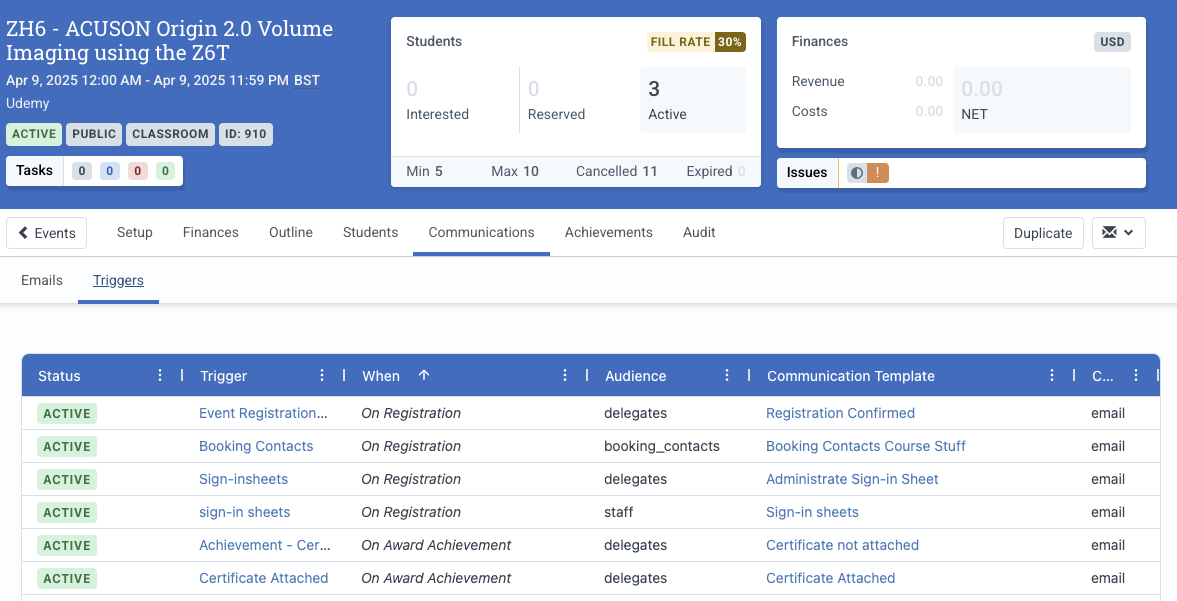
What’s changing
This update replaces the existing communication tab found within the Students Tab. The new communications tab provides a much more seamless experience for managing Event Communications.

Defects Resolved
- Fixed an issue where generated Certificates were not being properly attached to Event emails when using the Adhoc Emailer
- Fixed an issue where comma-separated lists of dates in Reports did not always show in chronological order.
Deprecation Notice
The scheduled removal date for the fields is 2025-03-31. The removal process is now underway and will be completed shortly.
| Input Type | Field | Replaced with |
| CoursePublicPriceInput | currencyCode | financialUnitId |
| CourseTemplateCreateInput | lifecycle | lifecycleState |
| CourseTemplateUpdateInput | lifecycle | lifecycleState |
| LearningPathLearnerRegistrationInput | currencyCode | financialUnitId |
| PrivateEventDetailsCreateInputType | currencyId | financialUnitId |
| RemoveEventStaffInputType | eventId | N/A. Field not necessary and is ignored |
| EventUpdateInputType | courseCode | code |
| EventUpdateInputType | location | locationId |
| EventUpdateInputType | taxType | taxTypeId |
| EventUpdateInputType | timeZone | timeZoneName |
| EventUpdateInputType | lifecycle | lifecycleState |
| EventRegisterContactsInputType | currencyCode | financialUnitId |
| CreateLmsResourceInputType | instructions | htmlDescription |
| CreateLmsResourceInputType | description | displayName for Content of type Separator, Discussion, Kryterion, and External. Otherwise in favor of htmlDescription. |
| UpdateLmsResourceInputType | instructions | htmlDescription |
| UpdateLmsResourceInputType | description | displayName for Content of type Separator, Discussion, Kryterion, and External. Otherwise in favor of htmlDescription. |
| EventAddPriceInputType | currencyCode | financialUnitId |
| EventAddPriceInputType | tokenTypeId | financialUnitId |
| SessionRemoveStaffInputType | sessionId | N/A. Field not necessary and is ignored |
| WebhookCreateInputType | emailAddress | notificationEmails |
| WebhookUpdateInputType | emailAddress | notificationEmails |