Calendar is a planning canvas for your whole training schedule. It shows you which events have issues, what those issues are, and lets you fix them with a few clicks.
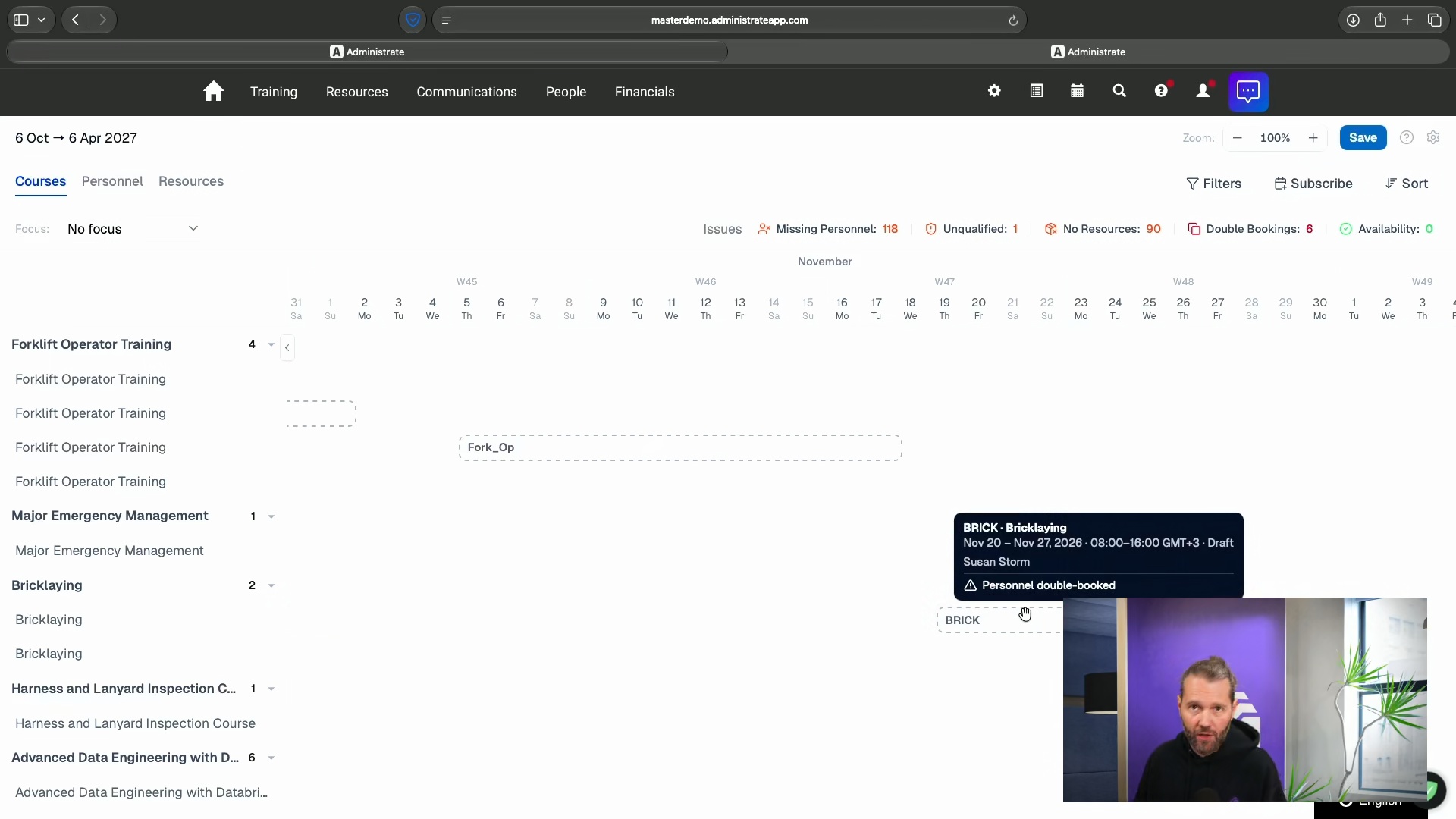
Spot problems fast
Find issues and conflicts, fix them with a few clicks
See your schedule at a glance
A quick glance shows you what’s gone wrong with scheduled events.
Drag and drop planner
Drag events, sessions, personnel, and resources around to see what works.
Every change is logged
Anything you change in Calendar is tracked, so you can always see who changed what and when.
Plan visually
See your whole schedule at a glance
When something goes wrong with your training schedule, those problems can sometimes be hard to find. Calendar tracks every event so you can quickly find problems and fix them, combining popular features in Conflict Alerts and our instructor availability tools to help you manage the daily challenge of managing live training.


Focus your view
Filter out the noise and focus on what matters to you
Set a focus view that highlights events carrying a specific kind of issue. Filter by date range, location, and resource type to narrow what you are looking at. You can look at issues on the events directly, or see lists of all issues of a certain type such as instructor availability conflicts or missing resources.
Drag and drop
Move an event and see what works, before you make changes
Drag courses, personnel, and resources around the canvas and see what happens when they bump against a new date. Conflicts and issues appear the moment you move a block around the Calendar. You get to look at conflicts in real time and then decide how to proceed. None of this is permanent, you’re just previewing what might happen to your schedule.


Guided fixes
Fix issues with a few clicks
Click an issue count and Calendar opens a window with the fixes already worked out for you. Administrate checks your requirements before suggesting a fix. This includes availability, instructor qualifications, instructor location, resource details and custom rules you can add.
Every unfilled role slot is grouped by event, with the role required, how many people you still need, and any qualifications attached. Equipment and room assignments work the same way. Administrate shows both sides of clashing bookings and tracks free capacity as you work, so somebody you just pulled off one event becomes available for the other.

Administrate allows us to use a seamless and invisible badging system. Learners register for a course, access the content, complete the course, and receive a digital badge. All automatically, with zero work from my team.
Frequently asked questions
Scheduler plans and creates your events in bulk from a course plan. Calendar works on events that already exist. You build the schedule in Scheduler, then use Calendar to tinker with it and make repairs without hunting for the right screen.


