Administrate General Release Notes
What’s New?
Add Student to Event via Training Passes
Starting tomorrow, October 21st 2025, From an Event, you can add or transfer students using Training Passes.
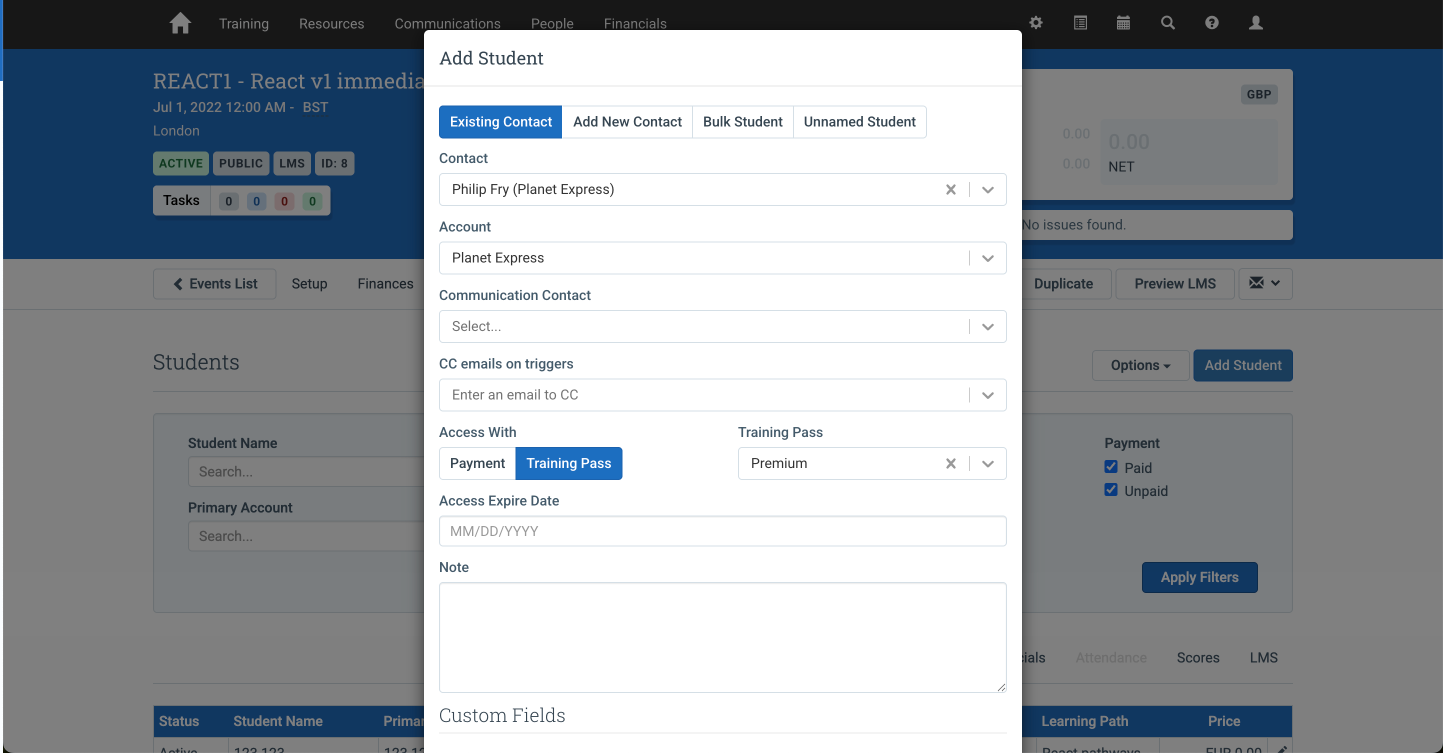
Training Passes let learners access a selection of your course catalog for a set period, giving them flexibility while boosting engagement and revenue. Learn more about Training Passes in our documentation.
How it works:
- Adding a student using a Training Pass: From an Event, click Add Student, select a learner with an assigned Training Pass, choose Access With → Training Pass, select the pass, and hit OK. A registration is created automatically.
- Transferring a student using a Training Pass: From an Event, click the pencil icon next to the student, choose Transfer Student, select the new Event and the Training Pass, then hit OK.
If a Training Pass doesn’t appear in the list, the student either doesn’t have one assigned, or the pass doesn’t cover the training. See more details here.
General
Additional Updates
Developer Experience
Action Required: The CourseTemplate.create mutation will require all required custom fields starting November 18, 2025.
Starting November 18, 2025, if you use the CourseTemplate.create mutation to create Course Templates via the API, you must include all required custom fields in your request or the mutation will fail validation. Please update your integration to pass all required custom fields before this date.
Defects Resolved
- You can now update the currency on a private Event via GraphQL.
- You can now retrieve the start date,
plannedEventStart, for a Booking Interest on a private Event via the API.