Purpose: Use this article to configure the Communications area of a Course Template.
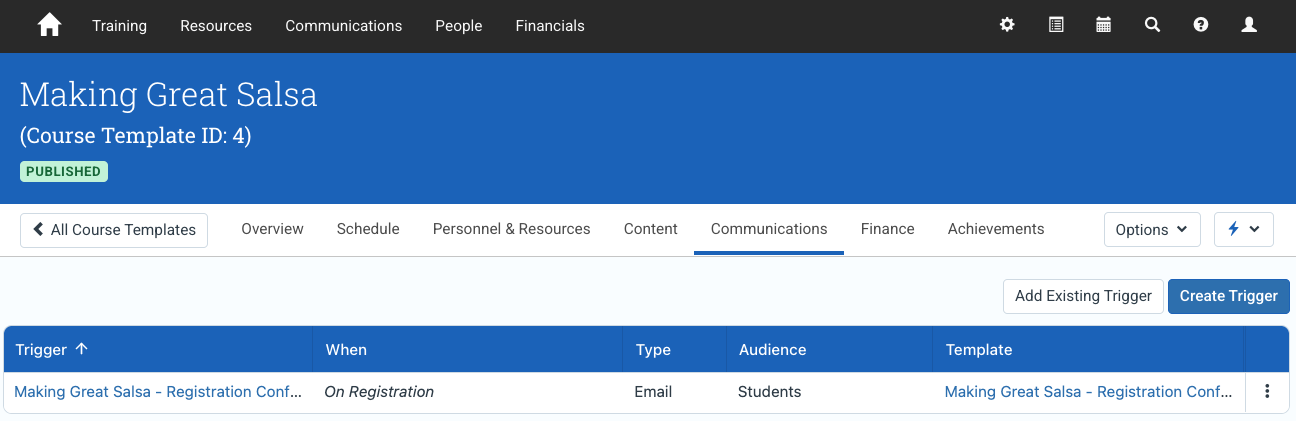
The Communications tab controls the communication framework associated with a Course Template. It helps define the messaging structure used for future Event delivery, including the templates and communication behavior inherited by Events created from the Course Template.
For the broader Course Template model and navigation across all tabs, see Understanding Course Templates.
In this article
- What the Communications tab controls
- Communications and Event delivery
- Configuring Course Template communications
- Communication template inheritance
- Event-level communication changes
- When to update Course Template communications
- Best practices
- Related Course Template guides
What the Communications tab controls
The Communications tab defines the communication structure associated with a Course Template. These settings help ensure that future Events begin with a consistent messaging framework.
- communication templates associated with the course
- default communication behavior inherited by Events
- the reusable communication structure used during Event delivery
Communications and Event delivery
Course Templates define the default communication structure for future Events. When an Event is created from the template, those communication settings can be inherited and then adjusted for the specific delivery if needed.
Note
Changes made to the Course Template communications affect future Events created from the template. Existing Events keep the communication configuration that was inherited when the Event was created.
This approach helps organizations standardize learner communication across repeated deliveries of the same course.
Configuring Course Template communications
Use the Communications tab to configure the communication framework associated with the Course Template.
- Open the Course Template.
- Navigate to the Communications tab.
- Add or configure the communication settings associated with the course.
- Save the Course Template.
The exact communication options available depend on your organization’s communication configuration.
Communication template inheritance
When an Event is created from a Course Template, communication settings can be inherited into the Event.
This helps administrators avoid recreating standard learner communication structures repeatedly.
Examples may include:
- registration confirmation messaging
- joining instructions
- pre-course reminders
- post-course follow-up communication
Event-level communication changes
Although communication settings can be inherited from the Course Template, administrators can still modify communications on an individual Event when needed.
This is useful when:
- a specific Event requires unique instructions
- a client delivery needs customized messaging
- communications differ for a particular audience or delivery method
Use the Course Template for reusable defaults and the Event for delivery-specific communication changes.
When to update Course Template communications
Administrators typically update the Communications tab when:
- learner messaging standards change
- joining instructions are updated
- new communication workflows are introduced
- the organization standardizes communication across Events
Best practices
- Use Course Templates to standardize communication structure across repeated deliveries.
- Review inherited communications before publishing or delivering an Event.
- Use Event-level changes only when the delivery requires exceptions.
- Review communication templates periodically to ensure learner messaging stays current.